All derived attributes draw their base from your
unmodified attributes. Therefore this MOD will
generally only affect direct attribute rolls and
skills rolls.
10pts/level
Unmodified
20pts/level
Unmodified:
20pts/level
Unmodified:
10pts/level
Unmodified:
Based on Intelligence
5pts/level
Unmodified:
Based on Perception
2pts/level
Unmodified:
Based on Perception
2pts/level
Unmodified:
Based on Perception
2pts/level
Unmodified:
Based on Perception
2pts/level
Unmodified:
Based on Intelligence
5pts/level
Unmodified:
Based on Willpower
2pts/level
Unmodified:
Based on Health and Dexterity
5pts/0.25
Unmodified:
Based on Basic Speed
5pts/level
Unmodified:
Based on Basic Speed
Unmodified:
Based on Strength
3pts/level
Unmodified:
Based on Strength
5pts/level
Unmodified:
| Strength | Thrust |
|---|---|
| 1 | 1d6-6 |
| 2 | 1d6-6 |
| 3 | 1d6-5 |
| 4 | 1d6-5 |
| 5 | 1d6-4 |
| 6 | 1d6-4 |
| 7 | 1d6-3 |
| 8 | 1d6-3 |
| 9 | 1d6-2 |
| 10 | 1d6-2 |
| 11 | 1d6-1 |
| 12 | 1d6-1 |
| 13 | 1d6 |
| Strength | Thrust |
|---|---|
| 14 | 1d6 |
| 15 | 1d6+1 |
| 16 | 1d6+1 |
| 17 | 1d6+2 |
| 18 | 1d6+2 |
| 19 | 2d6-1 |
| 20 | 2d6-1 |
| 21 | 2d6 |
| 22 | 2d6 |
| 23 | 2d6+1 |
| 24 | 2d6+1 |
| 25 | 2d6+2 |
| 26 | 2d6+2 |
| Strength | Swing |
|---|---|
| 1 | 1d6-5 |
| 2 | 1d6-5 |
| 3 | 1d6-4 |
| 4 | 1d6-4 |
| 5 | 1d6-3 |
| 6 | 1d6-3 |
| 7 | 1d6-2 |
| 8 | 1d6-2 |
| 9 | 1d6-1 |
| 10 | 1d6 |
| 11 | 1d6+1 |
| 12 | 1d6+2 |
| 13 | 2d6-1 |
| Strength | Swing |
|---|---|
| 14 | 2d6 |
| 15 | 2d6+1 |
| 16 | 2d6+2 |
| 17 | 3d6-1 |
| 18 | 3d6 |
| 19 | 3d6+1 |
| 20 | 3d6+2 |
| 21 | 4d6-1 |
| 22 | 4d6 |
| 23 | 4d6+1 |
| 24 | 4d6+2 |
| 25 | 5d6-1 |
| 26 | 5d6 |
Based on Strength
2pts/level
When you're hit points are low, you take penalties.
See Page 419.
| Reeling | |
| - Halve Move, Speed, and Dodge | |
| Verge of Collapse | |
|
- Roll every turn @{VS} HT or fall unconscious.
- Your HT roll is at -1 for every 1xHP you are below 0. - If you do nothing, and don't defend, you don't have to roll. |
|
| Verge of Death | |
|
- Roll once @{VS} HT to stay alive.
- If you fail by 1 or 2 you are mortally wounded, but not dead. - Roll again every time you take injury that puts you below another multiple of your max HP. |
|
| Death | |
| - You are dead. | |
| Total Destruction | |
| - Your body has been destroyed beyond recognition or ressurection. | |
Based on Health
3pts/level
When you're fatigue points are low you take penalties.
See Page 426.
| Tired | |
| - Halve Move, ST, and Dodge | |
| Verge of Collapse | |
|
- Further FP loss also comes off your HP.
- Roll against Will to do anything besides rest or talk. - If you fail your Will roll, you fall unconscious. - On a critical failure, roll @{VS} HT or suffer a heart attack. |
|
| Unconscious | |
|
- Immediately fall unconscious
- FP can't drop any lower, but you still lose HP. - You regain consciousness at 0 FP |
|
Rules can vary depending on what
magic system you are using.
Rules can vary.
It costs 5 points to raise this above or below the campaign"s
normal TL.
| TL0 | Stone Age (Prehistory and later). |
| TL1 | Bronze Age (3500 B.C.+). |
| TL2 | Iron Age (1200 B.C.+). |
| TL3 | Medieval (600 A.D.+). |
| TL4 | Age of Sail (1450+). |
| TL5 | Industrial Revolution (1730+). |
| TL6 | Mechanized Age (1880+). |
| TL7 | Nuclear Age (1940+). |
| TL8 | Digital Age (1980+). |
| TL9 | Microtech Age (2025+?). |
| TL10 | Robotic Age (2070+?). |
| TL11 | Age of Exotic Matter. |
| TL12+ | Whatever the GM likes! |
with one hand in one second.
with one hand in two seconds.
with both hands in four seconds.
shove and knock over.
shove and knock over with a running start.
over his/her back.
can shift slightly on a floor.
| 6 or less | 2x |
| 9 or less | 1.5x |
| 12 or less | 1x |
| 15 or less | 0.5x |
| 6 or less | 2x |
| 9 or less | 1.5x |
| 12 or less | 1x |
| 15 or less | 0.5x |
applied to attack the
specific location.
U: the weapon is unbalanced. You cannot use it to
parry if you've already attacked with it this turn
(and vice versa).
C: this weapon can be used in close combat.
*: the weapon is awkward, and requires a Ready
maneuver to switch between different reaches.
the damage - eg. (2) - is an armor divisor.
Enter this number as AD(#) or as
Armor Divisor(#) in the Damage Notes.
ex: indicates the attack causes an explosion.
See page 269.
| Abbr | Name |
|---|---|
| cut | Cutting |
| imp | Impaling |
| cr | Crushing |
| pi- | Small Piercing |
| pi | Piercing |
| pi+ | Large Piercing |
| pi++ | Huge Piercing |
| aff | Affliction |
| burn | Burning |
| cor | Corrosion |
| fat | Fatigue |
| tox | Toxic |
| spec | Special |
The maximum number of shots that can be fired in
one turn (by a regular person).
The minimum number of shots is 1.
!: minimum RoF is 1/4 of the maximum, rounded up.
mxn: fires the first number of shots, which each then split
into the second number (eg. shotguns)
Jet: shoots a continuous stream of fliud. See page 106.
The parenthetical number indicates the number of 1 second ready maneuvers
required to reload the weapon.
T: the weapon is thrown. To "reload" it, pick it up.
i: you must load the shots individually. the listed time
is for each shot.
by which you make your attack roll means you score
one extra hit, to a maximum number of hits equal
to total shots fired. See page 373.
the damage - eg. (2) - is an armor divisor.
Enter this number as AD(#) or as
Armor Divisor(#) in the Damage Notes.
ex: indicates the attack causes an explosion.
[#d]: indicates the attack causes fragmentation.
See page 269.
| Abbr | Name |
|---|---|
| cut | Cutting |
| imp | Impaling |
| cr | Crushing |
| pi- | Small Piercing |
| pi | Piercing |
| pi+ | Large Piercing |
| pi++ | Huge Piercing |
| aff | Affliction |
| burn | Burning |
| cor | Corrosion |
| fat | Fatigue |
| tox | Toxic |
| spec | Special |
Is the item being carried at the moment?
Known Issues
- Unable to delete a Technique - UPDATE
- The issue is the 'Max' value for the Technique. If any value was placed in there, the row will not delete. So in this PULL I have blocked values from being placed there so that new Techniques can be deleted if need be. Existing Techniques that you are unable to delete – the Devs are looking into that issue and will advise me.
- NOTE: Techniques, as it is now on the character sheet, does not really work well – that section will most likely be completely rewritten (I plan on doing it when I get some time and my skills at HTML improve).
Revision History
To report an Issues or a Suggestion, please use the Roll20 forum under Character Sheets & Compendium. U I have created a thread named: [GURPS] - Sheet #1 - Thread 1 (that seems to be similar to the naming convention used by other sheets).
https://app.roll20.net/forum/post/6616836/gurps-sheet-number-1-thread-1/?pageforid=6644122#post-6644122
In your post, please specify if it is an Issue or Suggestion with as much detail information as possible. Screen shots help a lot! I am just learning to work with HTML and CSS so I may not be able to do everything requested. I make no promises on how fast I may be able to implement a Fix or a Suggestion - so please be patient. -Thanks, Mike W.
If there are others that are working on or wish to work on this sheet, lets coordinate using the Roll20 Forum for now (Like Tom and I are doing) - perhaps later we can use GitHub.
Version: 1.3.9
Pull Request: 08/21/2018
- Changes, Fixes, and Adds made by Mike W (UserID: 1414610
- Updated the Language Box format – Cosmetic Only
- Added additional options for Native Language in regards to Spoken and Written levels as a Disadvantage
- Updated the Inventory Box format – Cosmetic Only
- Added fields of ‘TL’ (Tech Level) and ‘Ref’ (Reference) to the Inventory repeating section
- Fixed bug for Single Modifier Prompt and Extended Modifier Prompts if a ‘+’ is used for a positive modifier entry
Version: 1.3.8
Pull Request: 08/08/2018
- Changes, Fixes, and Adds made by Mike W (UserID: 1414610
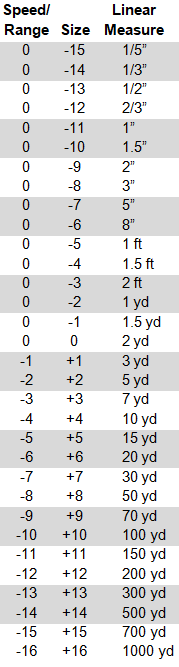
- Added the Speed-Range table image to the Combat Tab - Requested by CaptainJoy (UserID: GitHub)
- Set the character sheet to always open to the Updates Tab
- Fixed BUG where Basic Lift calculations for ST 7 or less was incorrectly rounding for Light, Medium, and Heavy Encumbrances
- Renamed Notes to Weapon Notes under Melee Attacks and Ranged Attacks – Cosmetic Only
- Added Damage Notes with an attribute under Melee Attacks and Ranged Attacks
- Changed Tool Tip for Damage, for Melee attacks and Ranged Attacks, to indicate using the Damage Notes field – Cosmetic Only
- Changed Armour Divisor to Armor Divisor – Cosmetic Only
- Changed the output of the Attack Macros for Melee and Ranged attacks to include the Weapons Notes attribute – Cosmetic Only
- Changed the output of the Damage Macros for Melee and Ranged attacks to include the Damage Notes attribute – Cosmetic Only
Version: 1.3.7
Pull Request: 08/01/2018
- Changes, Fixes, and Adds made by Mike W (UserID: 1414610
- Fixed alignment issue with the Notes field Under Skills not Left Justified – Cosmetic Only
- Changed Hit Location box to have an additional Header identifying User Created Locations – Cosmetic Only
- Changed all fields in the Hit Location box to be editable. This will enable you to change the name of any of the default Locations and the To Hit Penalty - Request from Valter (User id: 285013)
- Fixed Bug where some Hit Locations did not save their DR values
- Removed and Deleted the CR Label and attr_control_rating for Advantages. The correct terminology is Self-control Number and this is not used for Advantages
- Added an attribute for Native Language. Nothing fancy just a direct input - Requested by Flemmerr (User id: 1515009)
- Added the Recoil attribute to the chat results for the Ranged Attacks macro – Cosmetic only
- Fixed many miscellaneous issues to existing table fieldsets
Version: 1.3.6
Pull Request: 07/25/2018
- Changes, Fixes, and Adds made by Mike W (UserID: 1414610
- Corrected spelling of Miscellaneous on the General page – Cosmetic only
- Updated Tool Tip for Type under Melee Attacks and Ranged, removed the Multiplier information as it is irrelevant, also fixed the alignment – Cosmetic only
- Added missing information from Type drop down for Ranged Attacks – missing was Affliction and Special
- Changed the Label of ‘Quick Inventory’ to ‘Quick Inventory & Wealth’ and the Label left justified – Cosmetic only
- Changed the Melee Attacks and Ranged Attacks macros to include the Notes attribute in the results in Chat – Cosmetic only
- Changed all Die Macros to apply Bold to the Character Name in the results in Chat – Cosmetic only
- Change when adding a new Skill, Technique, or Spell, the Points defaults to 0 instead of blank
- Fixed minor spelling errors – Cosmetic only
- Renamed Header of CR to SCN under Disadvantages and Racial Trains to reflect correct terminology – Cosmetic only
- Fixed Tool Tip of SCN (formerly CR) under Disadvantages and Racial Trains to reflect correct terminology – changed from ‘Control Rating’ to ‘Self-control Number’ – Cosmetic only
- Added Macro for Self-control Number Roll within Disadvantages and Racial Traits
- Changes and Adds requested by Mike W (@mike-w) (UserID: 1414610)
- Spelling correction requested by Rabulias (@rabulias) (UserID: 4692)
Version: 1.3.5
Pull Request: 7/17/2018
- Changes made by Tom S
- Changed the word Fear to Fright (Visibility only - no attributes where changed)
- Changed the Macro result from vs. Will to vs. Fright
- Changed the Hit Location DR input to accept text (so that you can add DR entries like 2* or 3/1*)
- Changed the visible width of the DR field making it wider
- Fixed bug in Hit Location Penalty not saving for added custom location
- Added a Tool Tip for Pen header in Hit Location
- Requested by Mike W (@mike-w) (UserID: 1414610) see: https://app.roll20.net/forum/post/6572120/
Version: 1.3.4
Pull Request: 3/7/2018
- Changes made by MadCoder https://github.com/MadCoder253/roll20-character-sheets/issues
- Add Revision History Tab
- Changed roll buttons to use dicefontd6 (requested by Mike W (@mike-w) (UserID: 1414610) see: https://app.roll20.net/forum/post/5845539/
- Fix lift & encumbrance rounding error for low ST. Round to whole number. (requested by Lucy (@lucy) (UserID: 359497) see: https://app.roll20.net/forum/permalink/5142954/
Version 1.3.3
Pull Request: 3/1/2018
- Changes made by MadCoder https://github.com/MadCoder253/roll20-character-sheets/issues
- Restyled tabs to work with Firefox and MS Edge
- Traits tab -> disadvantages section: slight changes to column spacing
- Combat tab -> Ranged attacks section: slight changes to column spacing and abbreviate titles
- Skills Tab -> Techniques section: slight changes to column spacing
- Added URL to GURPS roll20 wiki